Restaurant waiter app
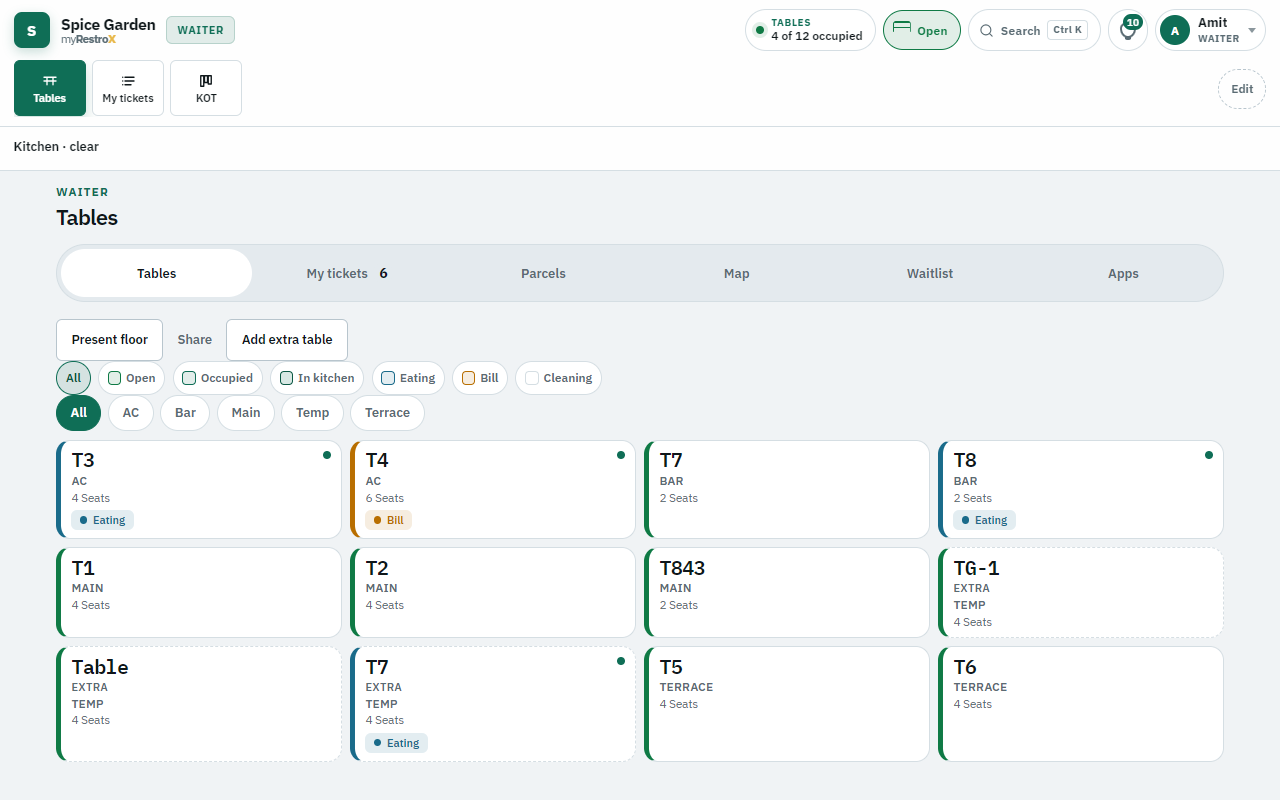
Waiters run /waiter on a tablet or phone browser: floor map, order entry, send KOT, send to cashier, and optional UPI when Control allows. Not a separate notepad app.
How it works
- 1. Seat or open channel — Pick table or start takeaway/delivery/phone order.
- 2. Punch items — Modifiers and spice stay separate lines; 86’d items cannot be added.
- 3. Send KOT — Kitchen board updates live; unsent cart blocks send-to-cashier.
- 4. Track ready — Ack ready alert; serve food; send to cashier for GST bill.
What waiters do in myRestrox
The waiter screen is the front-of-house entry point for dine-in, takeaway, delivery, phone, and WhatsApp orders. Everything stays on one ticket through kitchen and billing.
- Table map: seat, extra covers, waitlist when Control is on
- Channels: dine-in, takeaway, delivery, phone, WhatsApp manual punch
- Send KOT — new items can fire a second KOT, not silent overwrite
- My tickets — track open tables and takeaway
- Send to cashier — default when waiterTakePayment is off
- Optional take payment — cash or UPI when Control enables it
- Apps punch — Swiggy/Zomato ticket after accept on their tablet
- 86’d items greyed; shutter closed blocks new orders
Realtime with kitchen
When kitchen marks ready, waiter gets an alert to ack or snooze. Void and reduce need manager PIN — same rules as the till.
Questions
- Is there a native Android waiter app?
- The waiter UI runs in the mobile browser. Install to home screen if you want an app icon — same login and realtime.
- Can waiters change GST or discounts alone?
- Large discounts and voids need manager PIN. Waiters follow Control toggles set by owner.